


Vectors
Vector Creation Palette
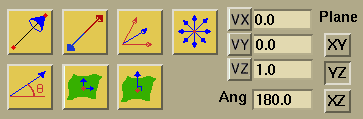
Examples of each button's functionality can be viewed by clicking on the button.

Creates a vector depending on the objects selected:
- If two points are selected, a vector is created from the first point selected to the second point selected.
- If a single point is selected, a vector is created using the information in the VX, VY, and VZ fields.
- If nothing is selected, a point is created using the values in the X, Y, and Z fields of the points application, and a vector is created from this point using the values in the VX, VY, and VZ fields.

If you wish to reverse the direction of any number of picked vectors, the Reverse vector direction button will do the action for you. The new vector will share the tail point of the picked vector as its tail point, but will point in the exact opposite direction of the picked vector.

If two or more vectors are picked, their average can be found simply by pressing the Average vectors button. This average is displayed in the VX, VY, VZ fields. The average vector may then be created by picking a point (to be the vector base) and then selecting the create vector button. If you pick two vectors that are in opposite directions of each other and of the same length (such as the original vector and the one created using the reverse vector direction button) you will get an error stating that you can not divide by zero.

Pick a point and then select this button in order to generate a set of unit vectors extending from the point. The vectors will be spaced at 15 degree increments. The point may either be specified in the X, Y, and Z fields or by picking the desired point. The plane field determines whether the wheel will be generated in the XY, YZ, or XZ plane. This helps in the construction of curves.
Creates a vector in the plane specified by the plane field
at the angle specified in the  angle
field. If a point is selected, the vector is created at that point.
Otherwise, the values in the X, Y, and Z fields will be used.
angle
field. If a point is selected, the vector is created at that point.
Otherwise, the values in the X, Y, and Z fields will be used.

Creates vectors tangent to the selected object at the selected points:
- If a surface and any number of points on that surface are selected, vectors are created tangent to the selected surface at each selected point.
- If a curve and any number of points on that curve are selected, vectors are created tangent to that curve at the selected points.

Creates a vector normal to the selected object:
- If a surface and any number of points on that surface are selected, vectors are created normal to the selected surface at each selected point.
- If a curve, a vector, and any number of points on the curve are selected, vectors are created normal to the local curve tangent and the selected vector at each selected point.
- If two vectors are selected, a vector normal to both selected vectors is created at the tail of the first vector.
- If three points are selected, a normal vector is created at the centroid of the three points and the direction is computed using the right-hand rule.
You can use the VX, VY, and VZ fields to input the components
of a vector which is to be generated. If the
 inquire command is used, then the components of the last vector picked
will appear in these fields.
inquire command is used, then the components of the last vector picked
will appear in these fields.

VX Unit Vector
Creates a unit vector in the X-direction.

VY Unit Vector
Creates a unit vector in the Y-direction.

VZ Unit Vector
Creates a unit vector in the Z-direction.
You can use the angle field along with the plane
field to specify the direction of the vector created using the
 create vector from angle command. The value of the field is measured in
degrees. This field is also used to specify the angle of rotation
when using
create vector from angle command. The value of the field is measured in
degrees. This field is also used to specify the angle of rotation
when using  in
in  .
.
You can determine the plane in which the vectors are to be generated by using the plane field.
 |
 |
 |
 |