


Geometry Utilities

Geometry Utilities Applications
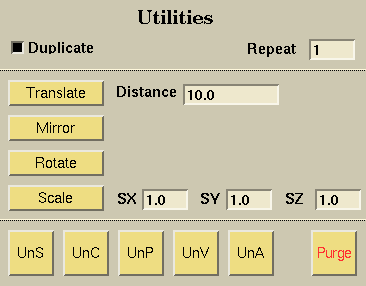
Examples of each button's functionality can be viewed by clicking on the button.

The Duplicate toggle determines whether the translate, rotate, or scale functions keep the original picked geometry. If the radio button is selected (darkened), the original geometry will be kept.

The Repeat field determines the number of times you wish to perform the translation, rotation, or scaling operation.

Translates selected objects (curves and surfaces) the distance and direction defined by the additional objects selected:
- if two points are selected, the objects are the distance between the points in the direction defined from the first point to the second point.
- if a vector is selected, the objects are translated the distance specified in the distance field in the direction of the selected vector (if no vector is selected, the direction is defined by the VX, VY, and VZ fields of the vector application). NOTE: If a distance of 0 is specified, a copy is created in the same location.

The distance field determines the magnitude of the translation. If the value of this field is zero, then the translation will create a copy of the picked surface.

To reflect a geometry about a given plane, pick the geometry and the necessary entities to define the plane. You may then select the Mirror button to carry out the reflection. The reflection plane is defined by a normal vector, which is either a picked vector, or the values of the vector VX, VY, and VZ fields and a selected point (if no point is selected the origin is used by default). The geometry will be mirrored in the opposite direction from where the vector is pointing. NOTE: Children of mirrored surfaces are mirrored, too. Mirrored objects remain in the same group as the original.

To rotate a geometry about a certain axis, pick the geometry and the necessary entities to define the axis of rotation, and then you may select the Rotate button to carry out the rotation. Rotate uses the vector angle field in conjunction with an axis of rotation. The axis of rotation can be defined by a picked point and a picked vector, a picked point and the values of the VX, VY, and VZ fields, or no picked point (uses the origin) and the VX, VY, and VZ fields. The vector angle field determines the direction and magnitude of rotation. NOTE: Children of rotated surfaces are rotated, too. Rotated objects remain in the same group as the original.

To scale a geometry in each dimension by the specified values in the SX, SY and SZ fields, you must first pick the geometry and a point (if you want the geometry scaled around a point other than the origin). You may then select the Scale button in order to scale the picked geometry. If a point is selected, the geometry will be scaled about that point. If no point is selected, the geometry is scaled about the origin. The distance of the object from the origin will also be scaled by the indicated values.

Scale factor applied in the x-direction.

Scale factor applied in the y-direction.

Scale factor applied in the z-direction.

Surfaces are undeleted to the current scene. The most recent surface deleted will be the first undeleted.

Curves are undeleted one at a time, starting with the most recent deletion. Also, if a surface is selected, all of the curves associated with that surface will be undeleted.

Points are undeleted one at a time, starting with the most recent deletion.

Vectors are undeleted one at a time, starting with the most recent deletion.

Everything is undeleted at once, including points, curves, and vectors.

Purge clears the undelete list. This frees the memory associated with storing deleted objects, but deleted objects will no longer be restorable.
 |
 |
 |
 |